Your ZPA discovery wildcard is a black box. Here's how to open it.
A ZPA discovery wildcard hides hundreds of domains behind one broad segment. ZHERO's Diagnostics Engine drills down to every domain and port in minutes.
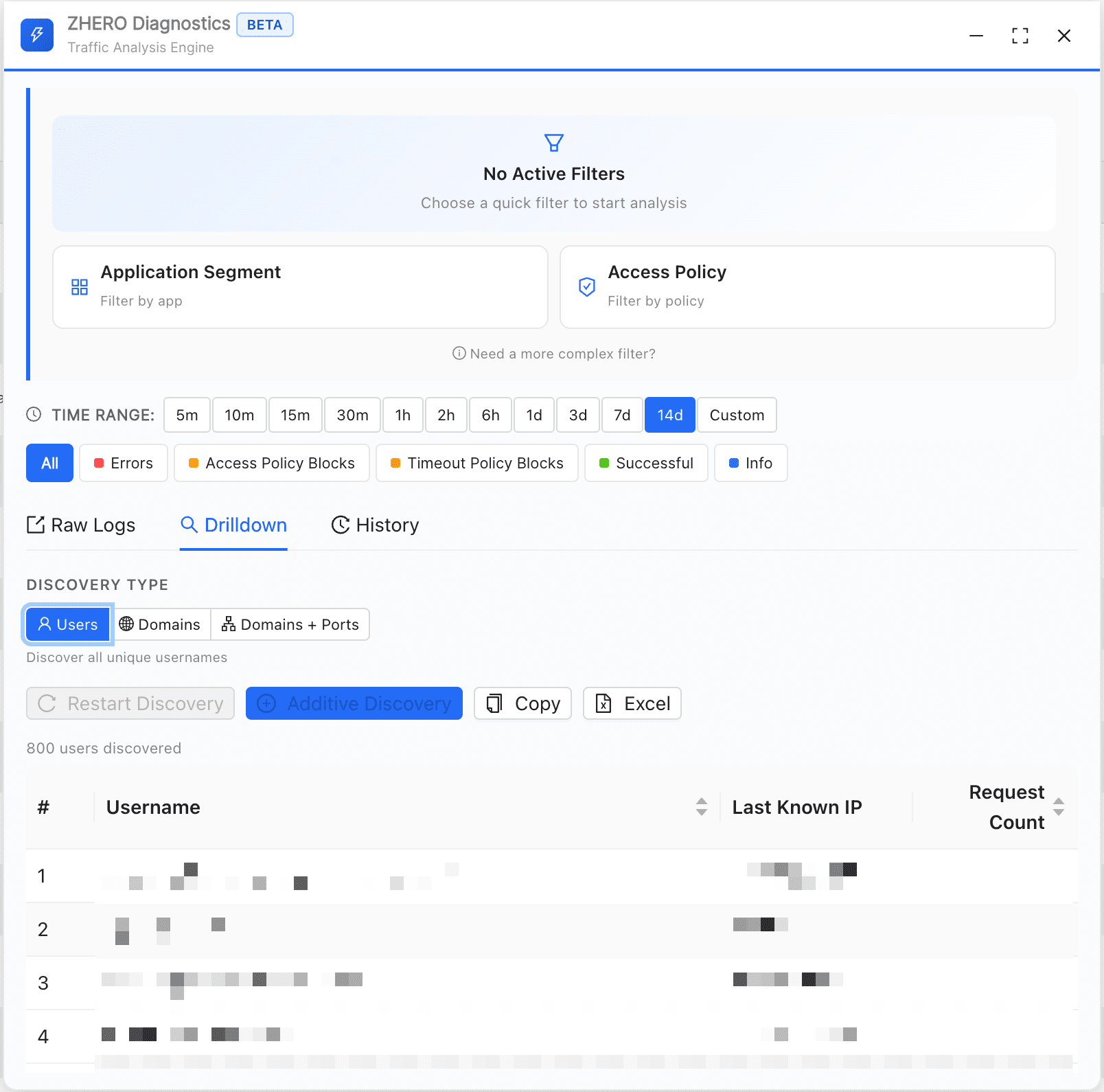
Every ZPA environment has application segments with broad discovery wildcards: necessary to catch traffic early, opaque within weeks. Hundreds of domains flow through, nobody is sure what is legitimate, and you have 14 days of logs to reason about. ZHERO’s ZPA Diagnostics Engine drills any search down to every domain and port your users actually hit, then exports it to Excel in one click.
The black box you built on purpose#
You did not make a mistake. Every ZPA rollout starts with broad segments so you can see what people reach before you lock anything down. The problem is that the broad segment never gets narrowed, because narrowing it means knowing exactly what is flowing through, and that knowledge is expensive to get. So the wildcard stays, and it becomes a black box: hundreds of domains, no certainty about which ones matter, sitting on your ZPA deployment as a permanently broad slice of access.
The native page shows data. It does not give answers.#
The native ZPA Diagnostics page is not the problem; it genuinely shows you data. But getting an answer from that data is a different story. Which users hit this segment. Which domains through this wildcard. Which port combinations. Answering any of those meant running multiple searches, manually cross-referencing them, copy-pasting into spreadsheets, and doing it against a rolling 14-day log window. The analysis is so tedious that most teams do the minimum and move on.
What the Diagnostics Engine does#
ZHERO’s ZPA Diagnostics Engine runs as a floating panel alongside the native page, so you work where you already are:
- You open it from the ZHERO menu, or right-click any entity: an application segment group, an FQDN, an IP, a policy, anywhere in the product.
- You set filters on the native page, and ZHERO reads them automatically.
- It runs in the background: minimize it, keep working, get a notification when the results are ready.
- It persists across pages: move between Access Policies, Application Segments, anywhere in ZPA, and your session stays where you left it.
It also ships with the details that make investigation bearable: raw diagnostic logs with infinite scroll, a search history that restores any previous query in one click, and a column selector. All of it lives on Investigation and Diagnostics.
The drilldown that matters: domain and port#
From any search result, you drill down three ways: by users (everyone who matched), by domains (everything accessed), and by domain and port (the full combination). That last one is the one that tightens wildcard segments, because it tells you exactly what to allow and what to drop. Then you export it to Excel in one click.
”We’ve been trying to get this data for months”#
On one engagement we were looking at a customer’s discovery segment. I opened the panel, ran a search on the wildcard, and drilled down by domain and port. In seconds we had a complete list of every domain and port combination the users were actually hitting.
The customer said, almost in passing, “We’ve been trying to get this data for months.” They used it to split the wildcard into targeted segments, removing dozens of domains that did not belong and shrinking the attack surface. Work that would have taken days of manual log analysis, done in minutes. The exported sheet is also the artifact you hand to whoever signs off on the change, which is the other half of the export story.
Make it a Monday routine#
Here is the part that outlasts a single cleanup. Because the domain drilldown exports every domain, every port combination and every access count into one sheet, you can run it weekly and build a picture of your traffic that reaches beyond the 14-day log window. The work that was too expensive to do once becomes your Monday morning routine, and your segments stay tight instead of drifting broad again.
Frequently asked questions
What is a ZPA discovery wildcard?
A broad application segment, usually built with wildcards, that catches everything so you can discover what your users actually reach. Every ZPA rollout starts with one. It is necessary early on, but it goes opaque fast: hundreds of domains flow through it and nobody is sure which are legitimate and which are noise.
How do you tighten a ZPA discovery segment?
You analyze the traffic logs to identify the real domains and ports users hit, then replace the broad wildcard with targeted segments that only allow those. The hard part was always the analysis. With a domain and port drilldown exported to Excel, you get the full list in minutes instead of days, then split the segment with confidence.
Is the ZPA Diagnostics Engine generally available?
Yes. It ships in ZHERO today and is refined with every release. Everything described here works now, and the panel and its drilldowns keep improving release after release.
Does the diagnostics data leave my machine?
No. The engine runs in your browser alongside the native ZPA console, using your existing admin session. The analysis and the exports are generated locally; your configuration and traffic data stay on your machine. ZHERO only ever receives licensing data.